EPIC-001
Epic · Improvement
Severity: tbd
Priority: "Would make me happy"
Improve date handling: UI and international formats
Attio's date handling is consistent at the storage layer — dates are stored as ISO 8601, as confirmed by Attio support in November 2024 and confirmed via API access, exports, etc. So the "core" is in good shape. The disconnect emerges at the input layer (no free-text entry, only a calendar popup with non-obvious behaviour), and at the display layer (American format by default — Feb 18, 1971 — for the ~96% of countries that do not use it). This Epic groups the two sub-issues that share that root.
ATT-001
Bug · UI/Usability
Date entry: no free-text input, date picker popup with multiple UX traps
AudienceExternal (mainly)
SurfaceWeb · date input on all objects
ReproducibilityAlways
EnvironmentLatest Chrome, macOS, locale de-CH
ReporterPeter Hogenkamp (external)
LinkedEPIC-001
Rationale
Date is one of the most frequently entered fields in a CRM. Users often enter dates while in motion — copy/pasting from another tool, cleaning up after a call, doing a bulk migration — when attention is at its lowest. A date-entry interaction that requires deliberation and procedural memory is, in those moments, a tax that compounds across hundreds of daily interactions. The current implementation imposes exactly that tax, on every date, every time.
The current design probably reflects a – fully justified – optimisation for the most common date-entry case in any CRM: setting a task due date, for which it works well. So the gap isn't in the design, it's in the assumption that one design serves both cases — which it clearly doesn't: what works fine for a date to be set to one of the next few days does not work at all for a birthday, or any other date.
Potential fixes:
- Make the date entry field more flexible, as described in "Expected behaviour" below.
- Define a "date layout" alongside each date field — the field's own rendering preference at creation time, distinct from workspace and user-level settings (see ATT-002).
Current behaviour
Currently, the calendar /date picker popup is the only path for entering or modifying a date. No free-text input field exists that would accept e.g. 27.3.1968 and translate it to the internal value. Every date must be navigated to through the calendar.
For a date in the currently displayed month, this works. For any other date, the user must understand the popup's three-step model — which is not signposted:
- Click the year displayed at the top of the popup.
- Navigate the year backward or forward (the amount of navigation depending on the currently displayed year — not a fixed number of clicks).
- Click the day in the resulting month view to commit the value.
First-time users typically begin by interacting with the days of the displayed month, then try the ‹ and › buttons. These step month-by-month, so entering the birthdate of someone in their fifties — starting from Attio's default of "today's month" — would require on the order of 700 single-month clicks. Few users discover the year-click on their own.
Note the default behaviour: when no value is yet set, the popup opens at the current month regardless of the field's semantics. For a Birthdate field — where today's date is, by definition, never the answer — this default does more harm than good.
Screenshot · empty state
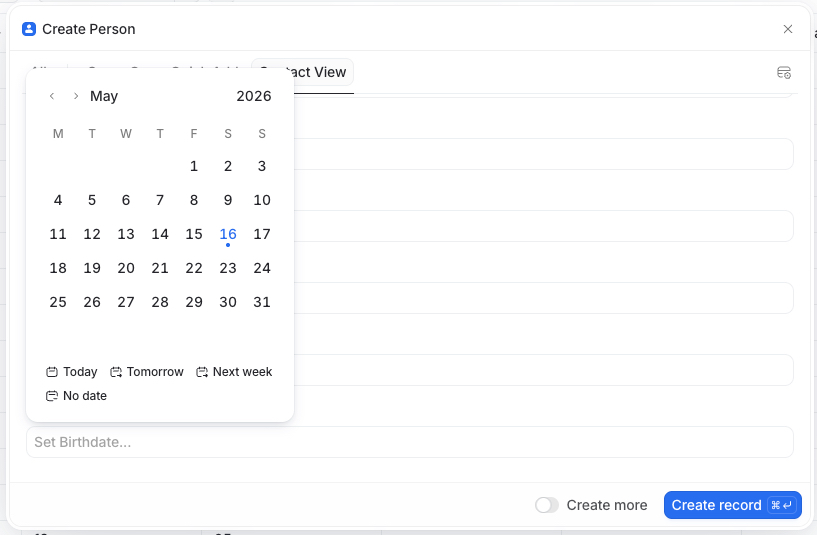
Empty Birthdate field on Create Person modal. Popup opens at May 2026 (today), 700+ months away from a typical birthdate.
Screenshot · destination state
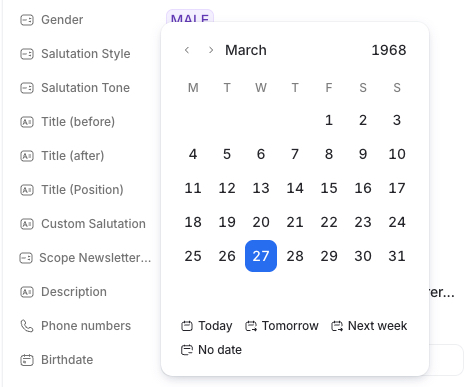
The state a user wants to reach: March 1968 with day 27 highlighted. Reachable only via the year-click path.
The sharper trap appears on modification of an existing value, when only the year needs to change.
The natural sequence — open popup, click year, change to new year, click the same day in the visible grid — does not commit the new value. The reason: the month layout updates only when the year input loses focus. Clicking the day before focus has left the year field commits to the still-displayed old year, not the new one.
The actually-working sequence is:
- Click the year.
- Change the year.
- Click outside the year field (or otherwise cause focus to leave) so the month layout updates.
- Click the day in the now-updated grid to commit.
Internal user reports indicate it takes 3–5 attempts on return visits before users remember this sequence. Less technically confident users may not arrive at it at all.
Screen recording · 25 sec
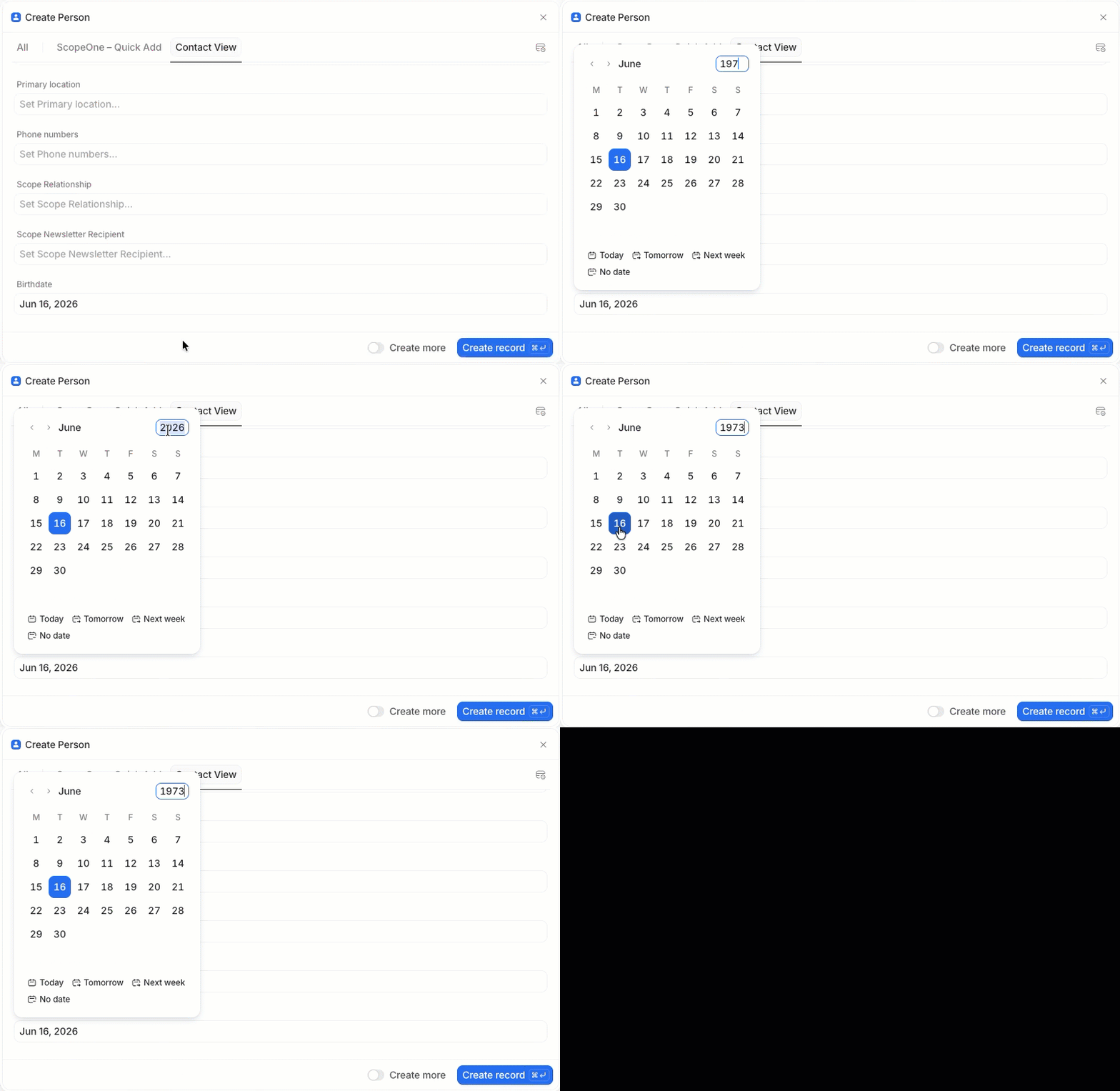
Demonstration of the year-change commit trap: three attempts before the value finally saves.
Expected behaviour
The structural problem — no escape from the popup — can be solved by either of two approaches that already exist as patterns in Attio's own design language. Both are listed; either is sufficient, both would be ideal.
Option A — Three-field modal entry. When a user enters edit mode on a date field, open a small modal with three sub-fields: Day, Month, Year. This mirrors Attio's existing pattern for compound fields like Name (First Name + Last Name) and Primary Location (City + State + Country). The current calendar popup, with its quick-pick options (Today, Tomorrow, Next week), stays as a secondary entry path for users who want to look at the month visually — preserving its strength for the task-due-date case.
Option B — Free-text input. Add a free-text input on every date field that parses common locale formats and ISO 8601 (27.3.1968, 16.05.2026, 1968-03-27) and commits on Tab or Enter. This is interdependent with ATT-002 — the accepted input format ought to mirror whatever the user has chosen as their output format. Some notations are genuinely ambiguous (05/07/26), but many are not (05/16/26); a user-centric system applies sensible logic — user locale, plausibility — before committing.
Secondary fixes (worth doing regardless of which option above is chosen):
- The year click is the primary navigation path for any date more than a handful of months from today; signpost it visually so first-time users find it.
- Changing the year and then clicking a day in the same gesture should commit the value, regardless of whether the month layout has visibly redrawn.
- The popup default for an unset field should respect the field's semantics. A Birthdate field should not open at today's month.
Acceptance criteria
Universal — regardless of which option above is chosen:
- A first-time user, given the task "enter the birthdate 27 March 1968", completes it in under 15 seconds — without coaching, without clicking the
‹ button repeatedly.
- From a stored value of
1968-03-27: opening the date entry, changing only the year to 1969, and committing produces 1969-03-27. The user's intent is preserved between actions; no silent reversion to the old value.
- For a field of semantic type Birthdate, opening the date entry on an empty value does not assume today's month/year.
If Option B (free-text) is implemented:
- Typing
27.3.1968 in any locale where this format is valid commits as 1968-03-27 without opening the popup.
- Typing
1968-03-27 commits the value in any locale.
Out of scope
- Display format (see ATT-002).
- Natural language ("next Tuesday", "Q4 2026") — a separate concern, not addressed here. Also, users will probably turn to the recently added AI chatbot for that type of interaction.
Open questions
- For free-text parsing of ambiguous strings like
01/02/2026: resolve by user locale silently, or show a non-blocking inline hint?
ATT-002
Improvement · UI/Usability
Date display: locale-aware formatting across all surfaces
AudienceExternal (non-US users)
SurfaceWeb · email notifications · CSV exports
ReproducibilityAlways
EnvironmentAll browsers, all locales ≠ en-US
ReporterPeter Hogenkamp (external)
LinkedEPIC-001
Rationale
Attio is built in London and serves customers globally. The 96% of the world that does not use US date conventions currently sees all dates in American format — month-first, English-abbreviated, comma-separated (Feb 18, 1971). The format is readable; it's just consistently non-native for everyone outside the en-US locale, and costs measurable cognitive load on every glance. Support's recommendation in November 2024 was to create a custom text attribute per date field — a workaround that does not scale past two dates and one user, and that disables the date semantics (sorting, filtering, calendar pickers) the system was built around.
Current behaviour
All dates render as MMM DD, YYYY — e.g., Feb 18, 1971 — regardless of workspace setting, user setting, or browser locale. The month name is always abbreviated English; the comma and month-first ordering are American conventions.
For non-US readers, even a fluent English speaker who knows what Feb 18, 1971 means still pays a small cognitive tax to translate it into their own internal date logic — and that tax compounds across every date rendered, on every screen, in a CRM whose value is partly in how scannable it is.
Workaround per Support (Nov 2024): create a custom text attribute per date, format manually, accept loss of date semantics.
Screenshot · live rendering
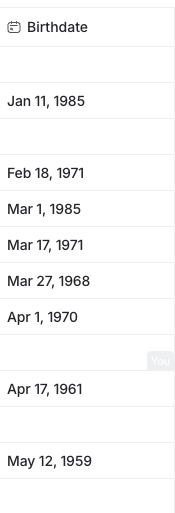
Birthdate column in a list view, rendered as MMM DD, YYYY (Jan 11, 1985 / Feb 18, 1971 / Mar 27, 1968 / …) regardless of viewer locale.
Note
Dates are stored and emitted via the API as ISO 8601 (Support, Nov 2024) — this is the good news. The change requested here concerns the display layer only; no schema, API, webhook, or export contract change is required.
Customer correspondence
One client explicitly asked for supporting multiple international date formats:
Initial client ask · 7 Nov 2024
"A smaller one: I have been looking for some time in the help section for a way to display the date (e.g. for a deal) in the usual sense, i.e. 7.12.2024 instead of '07.12.2024'. Is there no such setting? I know it's just cosmetic because the date is stored correctly as an ISO value."
Attio representative's response
"For the date, the only way to adjust this would be to create a custom attribute and store it that way."
Client's reply · 8 Nov 2024
"No, that would obviously suck. Instead, I trust that the $31m will put a decent international date formatting as output on the roadmap. For the time being, I can live with the weird US notation."
Expected behaviour
- Workspace-level setting: default date display format. Default for new workspaces: Auto (follow browser locale).
- User-level override: optional, overrides workspace default for that user only.
- Field-level layout (optional): when defining a date field, the workspace admin may declare a preferred layout for that specific field — e.g. a Founded date field might always render as Friendly regardless of who's looking. This mirrors Airtable's per-field format selector, and provides the place to hang the "date layout with the field definition" point raised in ATT-001.
- Supported formats (minimum), illustrated with 16 May 2026 in a de-CH locale:
- Local —
16.5.2026 (locale-aware separators and ordering, no leading zeros)
- Friendly —
16. Mai 2026 (locale-aware, full month name in the user's language)
- US —
5/16/2026
- European —
16/5/2026
- ISO —
2026-05-16
- Applies everywhere a date is shown to a human: list cells, record drawers, hover cards, activity feed, comment timestamps, calendar pickers, email notifications, in-app modals.
Prior art
Airtable solves this exact problem with a small format selector per date field. Five named options — Local, Friendly, US, European, ISO — each shown with a live preview of the current date. The naming reads well to non-developers, the previews remove ambiguity, and Local + Friendly are locale-aware so the same setting renders differently for a US and a German viewer without further configuration. The Expected behaviour above adopts the same nomenclature.
Screenshot · prior art (Airtable)
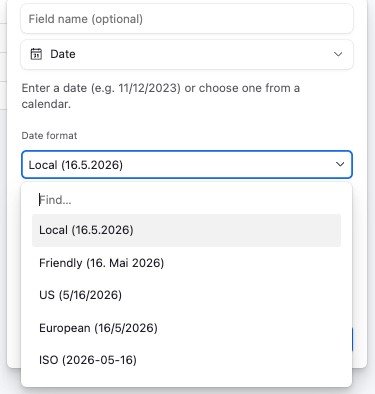
Airtable's date-field format selector with five named options and live previews. Locale-aware — "Local" and "Friendly" both adapt to the user's locale (here: de-CH).
And there is precedent inside Attio itself. The Number field type recently gained a Grouping option (Default / No groups), so that a member number, customer ID, or other large series of digits no longer renders as if it were a monetary amount (e.g. 1,234,567). The fix recognised that a single default cannot serve every field's semantics. The same principle applies to dates.
Acceptance criteria
- Format setting exists in workspace settings AND user profile, with workspace defaulting to Auto.
- Every surface listed above respects the resolved setting.
- Stored representation remains ISO 8601. No schema change. No API change.
- Sorting and filtering continue to operate on the underlying date value, not the rendered string.
- Round-trip test: setting changed → all listed surfaces update on next page load without cache clear.
Out of scope
- Time zone handling (related but separate; many places already configurable).
- Time format (12h vs 24h) — arguably should share locale machinery; follow-on ticket if so.
- Custom user-defined formats. Pick from the predefined list.
Open questions
- Default for new workspaces — Auto (locale-driven) or ISO 8601 (opinionated)? Defensible cases for both.
- Should the user-level override be visible to admins, or private? Privacy-friendly default: private.
- Resolution order between the three tiers (workspace default, user override, field-level layout). Suggested precedence: field-level wins when explicitly set; otherwise user override applies; otherwise workspace default.